Date: 22-JUNE-2022 Last Updated: 7-SEPTEMBER-2026
Introduction
The HSQ and PQ Kit Excel templates are designed to accommodate multiple UV detector configurations, including both Diode Array Detectors (DAD) and Variable Wavelength Detectors (VWD). Because these detector technologies obtain wavelength information differently, the appropriate worksheet fields must be populated correctly before generating qualification reports.
When using a Variable Wavelength Detector, it is important to ensure that only the VWD-specific fields are completed. Entering data into the incorrect section can cause the software to process the qualification using the Diode Array Detector workflow instead.
Switching from DAD to VWD Mode
To use the qualification template for a Variable Wavelength Detector:
Step 1: Clear the DAD Data Field
Locate the column labeled: "Found Wavelengths from Scanning Detectors" (approximately Column 181 in the spreadsheet).
Remove any values that may already be present in this field.
Step 2: Enter VWD Wavelength Data
Locate the column labeled: "Found Wavelengths for Manual Determination" (approximately Column 185 in the spreadsheet).
Enter the measured wavelength values obtained from the Variable Wavelength Detector qualification procedure.
Important Software Behavior
Do Not Populate Both Sections
The Excel template prioritizes the scanning detector fields when determining which qualification pathway to use. If any value remains in:
"Found Wavelengths from Scanning Detectors"
the software will automatically assume that a Diode Array Detector qualification is being performed. As a result:
- DAD calculations will be used.
- DAD reporting logic will be applied.
- The final certificate may not accurately represent the Variable Wavelength Detector qualification.
For VWD qualification, the scanning detector field should remain completely blank.
Excel Worksheet Reference
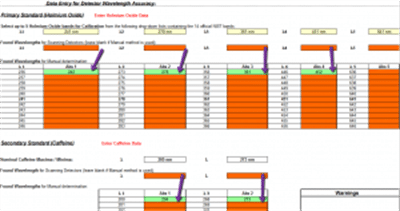
Example view of the HSQ/PQ Kit Excel qualification template showing the wavelength entry fields for Diode Array Detectors and Variable Wavelength Detectors.
Why This Matters
Correct field selection helps ensure:
- Accurate wavelength qualification calculations
- Proper detector classification
- Correct certificate generation
- Improved documentation integrity
- Consistent qualification reporting
This simple configuration step helps prevent errors before reports are finalized.
Additional Qualification Resources
Suggested Link Text:
Conclusion
The HSQ and PQ Kit Excel templates support qualification of both Diode Array Detectors and Variable Wavelength Detectors. For VWD qualification, clear all entries from the "Found Wavelengths from Scanning Detectors" field and enter wavelength values only in the "Found Wavelengths for Manual Determination" section. Following this procedure ensures that the software generates the correct calculations and final qualification certificate.